
Call for orders & pricing! (877) 241-0042
Cleanroom Air Conditioning & Handling Technology
Call for orders & pricing! (877) 241-0042
Cleanroom Air Conditioning & Handling Technology
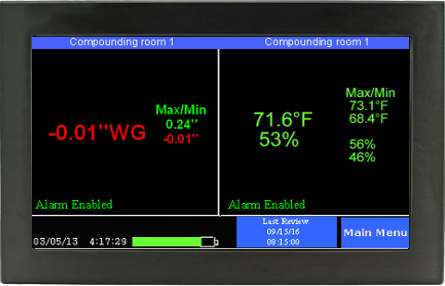
Text turns red when something is wrong
Quick review button for cleanroom personnel
Touchscreen with simple user configuration
Monitors temperature
Monitors RH
User-defined min/max settings on all variables.
72-hour battery backup
Automatically log temperature, pressure and RH
Easy installation; all software, hardware and wiring included
Simple user interface with touchscreen control panel
On-screen color-coded alerts when variables are out of scope
Remote monitoring via LAN/USB connection
Audible room alarm with optional SMS/email/phone alerts
72-hour battery backup: Keeps monitoring & logging in power failure
Store up to a year’s worth of data with 21CFR11 encryption & user defined intervals
| Channels | 3 – Temp/RH and pressure |
| QuickCheck Display | 1. Temperature (°F/C), Humidity (% RH) 2. Pressure (“WG) 3. Backup battery indication 4. Max/Min for each environmental variable 5. Alarm enabled/disabled 6. Date and time 7. Last time data reviewed |
| Monitoring | QuickCheck Display Green text=safe Red text=unsafe |
| Alerts |
|
| Alarm Settings |
|
| Sample Interval | Every 20 seconds |
| Environmental Condition Range |
|
| Employee Data Review | Button on QuickCheck display |
| Calibration | Temperature/RH NIST Traceable (optional) Pressure (Auto Calibrate) |
| Characterization | Three-point calibration table for each sensor |
| Display Controls | Easy-Touch display responds to a finger touch |
| Data Storage Technique | Non-volatile memory stores 80,000 samples per sensor |
| Power | Via USB cable to PC or power adapter (90 to 240vac) |
| Battery Backup |
|
| Output to PC | USB cable (Note: if USB cable is plugged into PC, power is supplied by PC) Local Area Network via wired Ethernet connector |
| PC Software |
|
| LCD Pixels` | 488 horizontal x 270 vertical |
| Mounting | Wall or panel mount |
| Display Weight | 1 pound |
| User settings | Via Easy-Touch display |
| LED Indicator | Green indicates AC power present |
| Power Supply | UL listed |
| Monitor | FCC and CE mark |
| Environmental condition alerts | Visual indications: Green = safe Red =unsafe |
| Data logging interval | Between 1/min and 1/day |